Quick Overview – How to Reset Oven After Power Outage
Power outages can easily throw off your oven’s settings, especially modern models that rely on digital control panels, clocks, and timers. When electricity cuts out, your oven may forget its last configuration or fail to respond until it’s properly reset. Don’t worry, learning how to reset oven after power outage is a simple process that usually takes just a few minutes.
This quick guide walks you through safe, easy-to-follow steps to get your oven running again. Whether you have a sleek digital model or a traditional knob-style oven, you’ll learn how to check power connections, reset your control panel, and verify everything works correctly before cooking.
Who this guide is for:
Perfect for beginners, renters, or homeowners with any type of electric or gas oven. No technical background needed just a few simple tools and a bit of patience.
Estimated time: Most resets take about 5–20 minutes, depending on your oven’s model and whether it needs a full power cycle or a quick oven control panel reset.
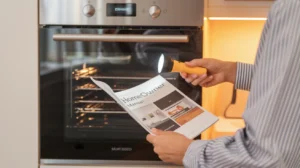
Safety First: Before You Start
Before you dive into how to reset oven after power outage, it’s important to make sure everything is safe. Power interruptions can sometimes trigger electrical surges or gas-related issues, so a few quick checks can protect you and your appliance.
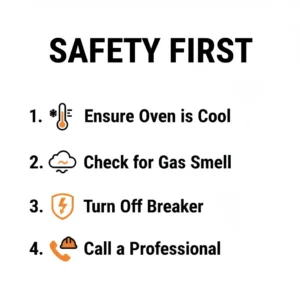
Turn Off Heat Sources and Confirm Oven Is Cool
Always begin by confirming that the oven is completely cool. If the outage happened while you were baking, let the oven sit for at least 10–15 minutes before touching any buttons or knobs. Unplug the oven or switch off the breaker to eliminate residual power. This simple step helps prevent burns or accidental restarts during your oven control panel reset.
How to Dehydrate Fruit in the Oven
Know Your Model: Digital vs. Mechanical Controls
Identifying your oven type will make the reset smoother.
- Digital ovens: These have electronic panels, timers, and touchscreens that might need a full power cycle.
- Mechanical ovens: These use manual knobs and dials, which may only require adjusting timers or reigniting pilot lights after power returns. Knowing which model you have ensures you follow the correct process for how to reset oven after power outage safely.
When to Stop and Call a Pro
Stop immediately and contact a professional if you notice:
- A gas smell or hissing sound (possible leak)
- Electrical sparks or visible damage to cords or the outlet
- A burning odor even when the oven is off
Trying to reset an oven with electrical or gas issues can be dangerous. Always prioritize safety over troubleshooting.
Quick Safety Checklist Before Resetting
- Make sure the oven and stovetop are cool
- Turn off the breaker or unplug the oven
- Check for any signs of smoke or gas smell
- Keep children and pets away from the area
- Confirm the power in your home is stable before restarting
Quick Checklist: What You’ll Need
Before performing any steps on how to reset oven after power outage, gather a few simple items to make the process smooth and efficient:
- Flashlight: Helps you see behind the oven or inside dim areas if power is partially restored.
- Owner’s Manual or Model Number: Needed for model-specific oven control panel reset instructions.
- Screwdriver: Useful if you need to open a panel or reset a tripped safety switch.
- Phone or Timer: Handy for timing power cycles (30–60 seconds off).
- Outlet Tester (Optional): Ensures the outlet is working properly after the outage.
Where to Find the Model Number and Manual
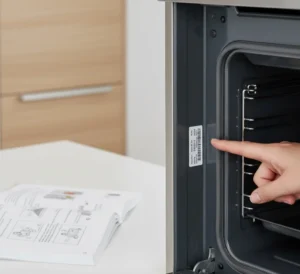
You can usually find the oven’s model number on a sticker inside the door frame, behind the drawer, or on the back panel. Once you have it, search online for your brand’s manual. It often includes a dedicated section on how to reset the oven after a power outage and other troubleshooting tips.
Having these tools ready means you’ll complete the reset faster, avoid guesswork, and stay safe while restoring your oven to normal operation.
Step-by-Step Reset: Digital / Control-Panel Ovens
Modern ovens rely on digital circuitry that can easily get disrupted after an outage. If your display is blank, frozen, or flashing an error, follow these simple steps to learn how to reset oven after power outage safely and effectively.
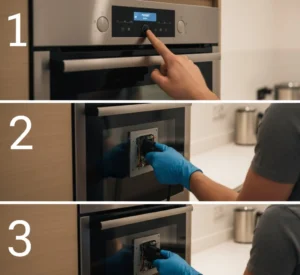
Step 1 Restore Power at the Breaker or Outlet
Start by ensuring your oven is actually receiving power. Sometimes, the circuit breaker trips during an outage or surge, cutting electricity to your appliance.
Here’s how to check:
- Locate your home’s electrical panel (usually in a hallway, basement, or garage).
- Find the switch labeled for the kitchen or oven.
- Flip the breaker fully off, wait a few seconds, then turn it back on.
- Plug the oven back in or confirm the outlet is working by testing it with another appliance.
If the display turns back on, you’ve successfully restored power. If not, continue with the next step of your oven control panel reset process.
Step 2 Use Manufacturer Reset (If Available)
Many modern ovens include a built-in reset feature or button sequence designed for power interruptions. This function clears temporary errors caused by voltage fluctuations.
Common reset options:
- Press and hold “Cancel” or “Clear” for 3–5 seconds.
- Press and hold both “Bake” and “Broil” together for 5 seconds.
- Hold “Start” or “Clock” for 10 seconds until the display resets.
Check the manual — some brands (like GE, Whirlpool, or Samsung) have model-specific reset codes.
If you can’t find a dedicated reset function, don’t worry proceed with a manual power cycle.
Step 3 Hard Power Cycle (Unplug or Switch Off Breaker for 60 Seconds)
When your oven doesn’t respond to button resets, performing a full power cycle helps discharge any residual electricity from the control board.
Steps for a hard reset:
- Unplug your oven from the wall outlet, or switch off its circuit breaker.
- Wait at least 60 seconds this allows internal capacitors to fully discharge.
- Plug the oven back in or turn the breaker on again.
This clears temporary memory faults and resets the electronic board. If you’re learning how to reset oven after power outage for the first time, this is often the fix that brings the control panel back to life.
Step 4 Re-enter Clock, Presets, and Timed Functions
Once power is restored, your oven’s display will likely flash “12:00” or “–:–.” This means the reset worked, but you need to restore your custom settings.
To reprogram your oven:
- Press the Clock or Timer button.
- Use the arrow or number pad to set the correct time.
- Press Start or Set to confirm.
- Re-enter any saved bake temperatures, cook timers, or delay-start functions you used before.
Completing this step ensures your oven’s internal system syncs properly after the reset, a key part of mastering how to reset the oven after a power outage.
Step 5 Run a Short Oven Test (Preheat to 350°F / 175°C for 5 Minutes)
Finally, confirm that everything is functioning normally.
Quick test procedure:
- Set your oven to bake and choose 350°F (175°C).
- Let it preheat for 5 minutes while observing the display and heating elements.
- Listen for unusual sounds or beeping, and check for any lingering error codes.
- Ensure the temperature rises steadily and the control panel responds correctly.
If the oven preheats smoothly and maintains temperature, your oven control panel reset is complete.
If the display flickers, shows a new code, or the oven won’t heat, you may need to refer to the troubleshooting section or call a technician but in most cases, these steps fully restore normal operation after a power outage.
Step-by-Step Reset: Mechanical / Knob-Style Ovens
If your oven doesn’t have a digital display or control board, the reset process is simpler but still important. Mechanical ovens can lose alignment during a power outage, especially gas models that rely on pilot lights or mechanical timers. Follow these easy steps to learn how to reset oven after power outage safely for knob-style units.
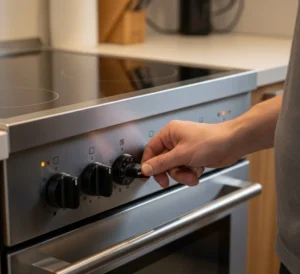
Step 1 Confirm Knobs Are in OFF Position After Power Returns
As soon as power is restored, double-check every control knob on your oven and stovetop. A sudden outage might leave knobs mid-cycle or slightly turned on, which could cause unwanted heating or gas flow when power comes back.
Do this first:
- Turn all bake, broil, and temperature knobs to the OFF position.
- Make sure your oven light or indicator isn’t flickering or staying on.
- For gas ovens, listen carefully for any faint hissing sound if you hear one, stop immediately and turn off the gas supply.
Confirming the OFF position ensures that when you restart your oven, it does so safely and under control a key part of how to reset the oven after power outage for manual units.
Step 2 Re-engage Any Pilot Lights or Gas Ignition (If Applicable and Safe)
For older gas ovens, the pilot light may go out during a power failure. You’ll need to safely relight it before using the oven again.
To relight your pilot light:
- Turn off the oven and wait a few minutes to allow any gas to clear.
- Open the oven door and locate the pilot assembly usually at the bottom near the burner.
- Turn the oven temperature knob to “Pilot” or press and hold the Pilot button (depending on your model).
- Using a long match or lighter, carefully ignite the pilot flame while holding the button.
- Keep holding it for 30–60 seconds, then slowly release.
If the flame stays on, the pilot is successfully relit. If it goes out immediately, repeat once more or check the manual for specific lighting instructions. For electronic ignition models, simply turn the oven to Bake and listen for the clicking sound that means it’s sparking to relight automatically.
Always ensure the area is ventilated and never attempt this step if you smell gas.
Step 3 Reset Mechanical Timers and Manual Clock Dials
After a power outage, mechanical clocks and timers can get stuck or spin out of sync. Without resetting them, your oven’s automatic bake or shut-off features might not work properly.
Here’s how to fix it:
- Locate the manual timer dial (usually a small clock face or twist knob).
- Rotate it until it shows the correct time.
- For older ovens with a Start/Stop timer system, turn both knobs back to “Manual” or “Off” before setting new bake times.
- Make sure the buzzer or bell isn’t stuck in an “on” position.
This ensures your oven’s time-based functions operate correctly once power stabilizes, an essential step when learning how to reset the oven after power outage for mechanical models.
Step 4 Test Bake Function and Flame/Igniter Operation
Finally, it’s time to make sure your oven is working again. Testing both the heat source and temperature function confirms the reset was successful.
To test your oven:
- Set the oven temperature knob to 350°F (175°C).
- For gas ovens, observe the igniter or pilot. It should light within a few seconds.
- For electric ovens, you should see or feel gentle warmth near the heating element after 2–3 minutes.
If the oven heats evenly and maintains temperature, the reset is complete.
If the oven doesn’t heat, or if you smell gas without ignition, turn everything off immediately and call a qualified technician.
Pro Tip: Once your oven is back to normal, label your knobs with a small marker or sticker for quick visual reference. This makes it easier to repeat these steps the next time you need to know how to reset the oven after a power outage quickly and safely.
Special Cases & Features
While most ovens reset the same way, there are a few exceptions that require extra care or additional steps. If you’re trying to figure out how to reset oven after power outage for a smart, gas, or built-in model, this section will help you handle each situation correctly and safely.
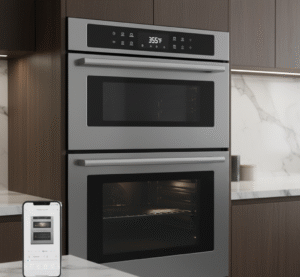
Ovens with Touchscreens / Smart Connectivity
Modern smart ovens often need more than just a power cycle. After an outage, they may lose Wi-Fi connections, saved cooking profiles, or touchscreen calibration.
Soft Reset vs Factory Reset:
- Soft Reset: Unplug the oven or turn off the breaker for 1–2 minutes, then power it back on. This clears minor software glitches while keeping your saved settings.
- Factory Reset: Use the settings menu (typically under “System,” “Device Settings,” or “Network”) to perform a full restore. This erases Wi-Fi credentials and custom modes ideal if the touchscreen freezes or fails to respond.
Reconnecting Wi-Fi or App: Once power returns, open your oven’s companion app (GE SmartHQ, Samsung SmartThings, Whirlpool App, etc.). Reconnect to your home Wi-Fi network, then sync your appliance again. If the oven still doesn’t connect, reboot your router and try pairing from scratch.
Knowing how to perform both resets ensures your smart oven returns to full functionality after a power outage.
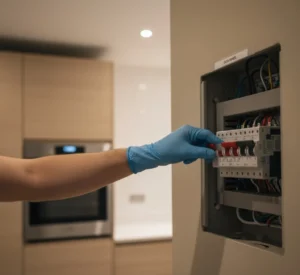
Built-in Ranges with Separate Cooktop and Oven Breakers
Some wall ovens and slide-in ranges are wired with two separate breakers one for the cooktop and another for the oven. After a power surge, only one breaker may trip, causing partial power loss.
How to Identify and Reset Correctly:
- Locate your main electrical panel.
- Look for two labeled switches (for example, “Cooktop” and “Oven”).
- Flip both switches off, wait 10 seconds, and turn them on again.
- Test both appliances individually to make sure the oven display lights up and the cooktop heats properly.
If only one part is working, double-check that the correct breaker controls the oven. A simple breaker reset often solves most “dead” oven issues when learning how to reset oven after power outage in built-in setups.
Gas Ovens vs Electric Ovens: Extra Safety Checks
Gas and electric ovens react differently to power interruptions, so it’s important to perform the right post-outage checks before resetting.
For Gas Ovens:
- Smell for gas before touching any controls.
- Make sure the gas valve is in the “ON” position and that no pilot lights are out.
- If you detect a gas odor, leave the area and call your gas supplier or a certified technician.
For Electric Ovens:
- Inspect the power cord for any scorch marks or melted areas caused by surges.
- Test the outlet using another small appliance.
- Never force the plug if it feels loose or warm to the touch.
Taking these steps ensures that your reset process is both safe and effective, especially for homeowners handling how to reset the oven after power outage across different oven types.
Ovens That Keep Showing Error Codes After Reset
If your oven continues to display error messages even after completing a power reset, it may have deeper electronic faults or sensor issues.
Common Error Codes and Their Meaning (varies by brand):
- F1 / E1: Control board or keypad fault.
- F2 / E2: Temperature sensor issue or overheating detected.
- F3 / E3: Internal temperature probe error.
- F9 / Door Error: Door lock mechanism malfunction.
What to Do:
- Unplug the oven again for 5 minutes and plug it back in.
- If the error persists, press and hold “Cancel” or “Off” for 10 seconds.
- Check your manual to confirm what the specific code means.
- If the code reappears, schedule service the control board may need replacement.
Frequent error messages usually signal electrical damage from the outage, so it’s best to involve a professional if resets don’t help.
Troubleshooting: Common Problems After a Reset
If your oven still isn’t working properly even after following how to reset oven after power outage, these are the most common post-reset issues and how to fix them.
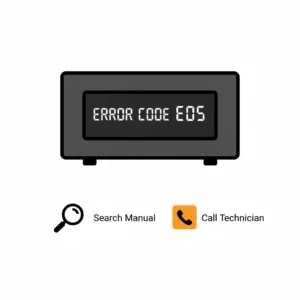
Oven Won’t Power On at All
- Check that the circuit breaker is fully in the “On” position.
- Test the wall outlet with another device (like a lamp).
- Verify the oven’s power cord is firmly plugged in and undamaged.
- For hardwired ovens, confirm the wall switch or fuse hasn’t blown.
If the oven remains completely dead, there may be internal fuse damage or a failed control board.
Display Is Blank or Flickering
This typically means the oven’s electronic control board was affected by a power surge.
Fix:
- Perform a 5-minute hard power cycle.
- If the display still flickers, the circuit board or display ribbon cable might be loose.
- Surge protectors can prevent this in the future.
If the screen won’t stabilize, the control panel may need replacement.
Clock Resets Repeatedly
If your oven’s clock keeps flashing “12:00” after each restart, the backup capacitor or internal memory chip may be failing.
Fix:
- Reset the clock and monitor it for 24 hours.
- If it resets again, unplug for 5 minutes, then plug back in.
Persistent resets after stable power suggest a hardware issue that needs professional attention.
Oven Heats Unevenly After Reset
Sometimes, after restoring power, the oven’s internal calibration resets to default, causing uneven heating.
Fix:
- Preheat the oven to 350°F (175°C).
- Place an oven thermometer inside and compare the actual vs set temperature.
- If there’s a large difference (±25°F or more), recalibrate using your manual’s instructions.
This ensures consistent baking and restores your oven’s accuracy after the outage.
Quick Decision Guide: DIY Fix vs Professional Repair
| Symptom | DIY Fix | When to Call a Pro |
|---|---|---|
| Oven won’t turn on | Check outlet, breaker, and cord | Still dead after power confirmed |
| Display flickers | Hard reset | Flickering persists or smells of burning |
| Error code reappears | Manual reset or code lookup | Code persists after two resets |
| Uneven heat | Run calibration | Heating element failure |
| Gas smell or sparks | Stop immediately | Licensed technician required |
Knowing these limits helps you handle how to reset oven after power outage, responsibly and safely fixing what you can, and knowing when expert help is needed.
Tips to Prevent Settings Loss in the Future
After you’ve learned how to reset oven after power outage, it’s smart to take a few precautions so you won’t have to repeat the process every time the lights flicker. These small steps help preserve your oven’s memory, protect the control board, and save you from future frustration.
Use a Surge Protector for Plug-In Ranges (If Recommended)
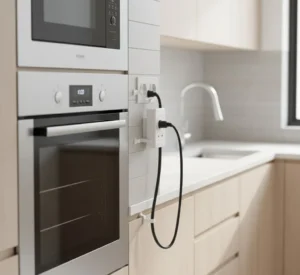
Power surges during outages are one of the main reasons ovens lose their settings or suffer board damage. If your oven is a plug-in model, use a heavy-duty surge protector that’s rated for high-wattage kitchen appliances.
Check your owner’s manual first. Some manufacturers specify which type of surge protector or line conditioner is safe for your oven model. Installing one helps shield the oven control panel reset system from voltage spikes and extends the life of your appliance.
Record Key Settings for Quick Re-Entry
Most modern ovens allow you to save custom cooking presets, temperature profiles, or timer settings. However, these can be erased after a power outage.
Before the next storm hits, take a quick photo of your control panel showing your usual settings — bake temperature, timer intervals, and convection preferences. Having this handy means that even if you need to repeat how to reset the oven after a power outage, you’ll reprogram your oven in seconds instead of guessing.
Smart Alternatives: Battery-Backed Clocks or Apps
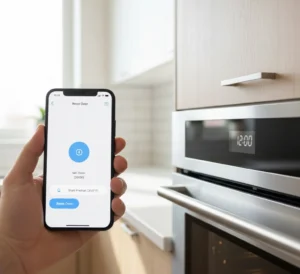
If your oven is Wi-Fi enabled or app-connected, use its mobile app to back up presets or remotely reset the oven after power is restored. Some brands also feature battery-backed clocks that hold time even when the main power fails.
If your oven doesn’t have these features, consider an external timer or smart plug with memory retention. These small investments can save time and prevent repeated resets every time your power blinks.
Regular Maintenance Checks
Keeping your oven in good shape reduces the chances of electronic glitches. Every few months:
- Inspect the power cord for wear or fraying.
- Make sure the breaker and outlet are tight and dust-free.
- Check gas lines for leaks (use soapy water to test safely).
- Clean the control panel gently to prevent button malfunctions.
A bit of preventive care ensures that you rarely have to use how to reset oven after power outage. Again, your oven will retain memory and function smoothly even after short blackouts.
Common Mistakes to Avoid
When trying to reset an oven after a power outage, it’s easy to make small errors that lead to bigger problems. Avoid these common mistakes to keep your oven safe and prevent further damage.
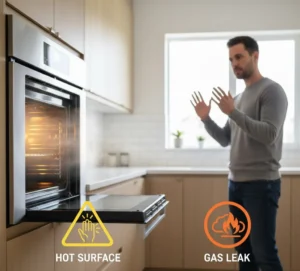
1. Trying to Reset While the Unit Is Hot or While Gas Is On
Never attempt to reset your oven right after a power restoration while it’s still hot or connected to an open gas line. Wait for it to cool completely, and confirm that all knobs and valves are in the OFF position before pressing any buttons or resetting the breaker.
2. Skipping the Breaker Check
Many people assume their oven is dead after an outage when, in reality, the circuit breaker has tripped. Always check your breaker panel before touching the control panel or calling a technician. Resetting the breaker can often bring your oven back instantly.
3. Forcing Buttons or Opening Sealed Control Panels
Avoid pressing buttons repeatedly or prying open the oven’s electronic panel. The control board is delicate and easily damaged. Forcing it open or short-circuiting it can void your warranty and make repairs more expensive.
If your oven doesn’t respond to button presses, unplug it and perform a manual power cycle instead, the safest method when practicing how to reset the oven after a power outage.
4. Re-Entering Settings in the Wrong Sequence
After restoring power, make sure to follow your oven’s correct clock and bake setup order. Entering settings in the wrong order for example, setting the temperature before the clock can trigger temporary errors or cause the oven to ignore the command.
Always refer to your user manual or follow the general order: Clock → Mode (Bake/Broil) → Temperature → Start.
Pro Tip: Keep a small sticky note with this reset order on your oven or inside a nearby cabinet. The next time there’s a power outage, you’ll know exactly how to reset oven after power outage quickly and safely without confusion or mistakes.
Frequently Asked Questions (FAQ)
1. How long should I wait after a power outage to reset my oven?
Before you begin how to reset oven after power outage, it’s best to wait at least 5–10 minutes after the electricity is restored. This allows the power grid to stabilize and prevents another sudden surge from damaging your oven’s control board. Once your lights stop flickering and power seems consistent, you can safely proceed with your reset steps or perform an oven control panel reset if needed.
2. My oven shows an error code after resetting — what next?
If your display flashes an error code after you’ve tried to reset the oven after a power outage, it’s usually your oven’s way of reporting an electrical glitch or temperature sensor issue. Here’s what to do:
- Unplug the oven again for 1–2 minutes.
- Plug it back in and check if the code disappears.
- If it remains, note the code and look it up in your owner’s manual or on the manufacturer’s website.
Common codes like “F1,” “E0,” or “PF” indicate power interruptions and a simple oven control panel reset often clears them. If the code persists, contact customer support or a technician to check your control board.
3. Can I reset my oven by only turning the knob?
Not always. While some older ovens can be “reset” by turning all knobs to the OFF position and waiting a few minutes, most modern units require a digital reset through the control panel. If your oven has a Start/Cancel or Clock button, follow the manufacturer’s reset procedure instead of relying solely on the knobs. This ensures that all internal programs and timers are re-synced properly after a power interruption.
4. Is resetting different for gas ovens vs electric ovens?
The general principle of how to reset oven after power outage is similar for both, but there are small differences:
- Gas ovens: Make sure the gas supply is turned off before resetting. Check for any unusual smells, and if you detect gas, ventilate the area before proceeding.
- Electric ovens: Focus on verifying the breaker and outlet first, since electric ovens are more sensitive to surges.
In both cases, unplugging for a few minutes and performing an oven control panel reset usually does the trick.
5. Will resetting my oven delete saved presets or profiles?
Yes, it can. During how to reset the oven after power outages, most ovens revert to factory settings which clear stored timers, custom baking modes, and temperature presets.
If your oven has a smart or app-connected feature, check whether it supports cloud backup or memory retention. Some modern models automatically restore your settings once Wi-Fi reconnects.
6. Can a power outage permanently damage my oven’s control board?
In rare cases, yes especially if the outage involves a voltage spike or lightning strike. The sudden surge can fry internal circuits on the electronic control board.
To avoid this, always use a surge protector for plug-in ovens and wait a few minutes before performing how to reset the oven after a power outage. If your oven still doesn’t power on after multiple reset attempts, you may need professional repair or a replacement control board.
Pro Tip: Keep your oven’s manual and a printed reset guide nearby. The next time your power blinks, you’ll know exactly how to perform a safe oven control panel reset without stress or guesswork.
When to Call a Professional
Even after following every step on how to reset oven after power outage, there are times when your oven might still act up and that’s your cue to bring in an expert. Attempting repeated resets when there’s an underlying issue can make the problem worse or even create safety risks.
Signs You Need Immediate Service
If you notice any of these warning signs, stop using your oven and call a qualified appliance technician:
- A gas smell or faint odor of fuel even when the oven is off.
- Sparks, flickering lights, or unusual buzzing noises from the control panel.
- Persistent error codes that won’t clear after a proper oven control panel reset.
- Burning or electrical odors when you plug the oven back in.
- The display remains blank or buttons stay unresponsive despite a full power cycle.
These issues could signal deeper electrical faults, control board damage, or sensor failure that can’t be fixed through a standard reset.
What to Tell the Technician
When scheduling a repair, share the following details to help your technician diagnose faster:
- Brand and model number (usually found on the oven frame or door edge).
- The exact error code displayed after your reset attempt.
- A quick summary of what you’ve already tried, such as unplugging, breaker check, or manual how to reset the oven after power outage steps.
- Any unusual sounds or smells noticed since the outage.
This information helps technicians bring the right tools and replacement parts on their first visit saving you time and service fees.
Repair vs. Replacement Considerations
Here’s a quick way to decide your next move:
- Repair if: the issue is limited to the control panel, fuse, or wiring.
- Replace if: your oven is 10+ years old, repeatedly fails after resets, or repair costs exceed 50% of replacement value.
- Upgrade option: newer ovens often include surge protection and automatic recovery saving you from having to repeat how to reset oven after power outage in the future.
Conclusion
When a blackout throws your kitchen off schedule, knowing how to reset oven after power outage puts you back in control quickly and safely. With just a few steps checking power, performing an oven control panel reset, and confirming your settings you can often fix the issue without calling for help.
Quick Recap Checklist
- Unplug the oven for 1–2 minutes.
- Reset the breaker if tripped.
- Perform the control panel reset sequence.
- Re-enter the time and cooking settings.
- Test heating functions before cooking.
Remember: most oven reset issues are simple fixes, but safety always comes first. If something smells off, sparks, or won’t respond after multiple tries, don’t push it, call a technician to inspect it properly.
Downloadable Resource:Get our Free One-Page “Quick Reset Checklist” , a printable guide that walks you through every step of how to reset the oven after a power outage safely and efficiently. Keep it in your kitchen drawer for the next time the lights flicker.